
 By Russell Cargill
In a nutshell
Email DDx is an order of work on an email account: symptoms, a list of possible root causes, evidence mapping, confirmed root cause(s), fix order, then follow-up.
What differential diagnosis means here
Differential diagnosis is a way to figure out what could be causing the problem.
And this is where hypothetico-deductive reasoning (you write a possible explanation, decide what you'd expect to see if it were true, then go look) comes in.
If you find what you expected, that explanation gets stronger. If you don't, it gets weaker. And if the evidence clearly points the other way, you can rule it out.
When I say differential diagnosis, I mean this part: several possible causes, worked through one by one to see which ones still hold up. The diagnosis comes after that.
That's the point where you can say, "Okay, we have enough evidence. This is what's going on, and this is what we need to fix."
You might still have two possible causes at this point. (That's okay. It just means you don't have enough evidence yet to rule one of them out.)
The important thing is that every cause on your list should lead somewhere. You should be able to say, "If this is the problem, what should I be able to find in the account?" Then you go look. Each one should give you something concrete to check...
Why write the list at all?
There are two main reasons we do this to diagnose email marketing with Email DDx, especially when the problem seems pretty obvious at first.
To avoid "tunnel vision" (combating cognitive bias)
Basically, to avoid jumping to the first answer in mind. People lean toward anchoring bias (sticking with the first explanation that shows up).
For example, it's easy to hear "open rates are down" and immediately think, "The copy must be bad." But that's only one possibility. The emails could be landing in spam. The people receiving them might be less engaged this week.
The tracking could have changed. Apple Mail could be affecting the numbers. Or maybe we're simply looking at a different group of people.
Writing down the possible causes forces us to keep those options open. The point isn't to come up with a huge list just for the sake of it. It's to stop ourselves from deciding what the problem is before we've checked and tested...
To pick the checks that help you figure out what's wrong - before you start fixing things
Different problems need different checks. If you think it's a deliverability issue, check where the emails are landing and whether Gmail is happy with the domain. If it looks like a list problem, check where those subscribers came from and how recently they've been engaging.
If you think it's a tracking issue, make sure checkout and order data are still coming into Klaviyo. Then compare Klaviyo's revenue with Shopify's email/UTM numbers. They won't always match exactly, but a big difference is worth looking into.
Because you don't want to spend a week testing new emails when the problem is that your emails aren't even reaching the inbox. The list of possible causes helps you decide what to check first, before you spend time or money fixing the wrong thing.
When open rates suddenly drop
Say your open rate suddenly drops a lot in one week. Don't assume you know why yet. It could be a deliverability problem - maybe more emails went to Spam or Promotions.
It could be one specific group of subscribers that performed worse. It could even be a tracking change that makes the numbers look worse than they are.
Klaviyo documents that Apple Mail Privacy Protection can also mess with open data because it can load the tracking pixel before someone reads the email. So opens aren't always a perfect number to rely on. Clicks and orders can give you a better sense of what's happening.
Then you check each possibility against the data. Where did the next send land? Who actually received it?
Did engagement fall for everyone, or just certain groups? Did clicks and orders fall too? Did anything change with DNS, DMARC, or Gmail Compliance Status?
At this point, you might find that placement looks completely fine. Or you might find that one part of the list started going to Spam after a filter change. Keep the possible causes on the board until the data gives you enough evidence to support one or rule it out...
How to run the Email DDx framework
A number tells you what changed. Email DDx is how you figure out why it changed...
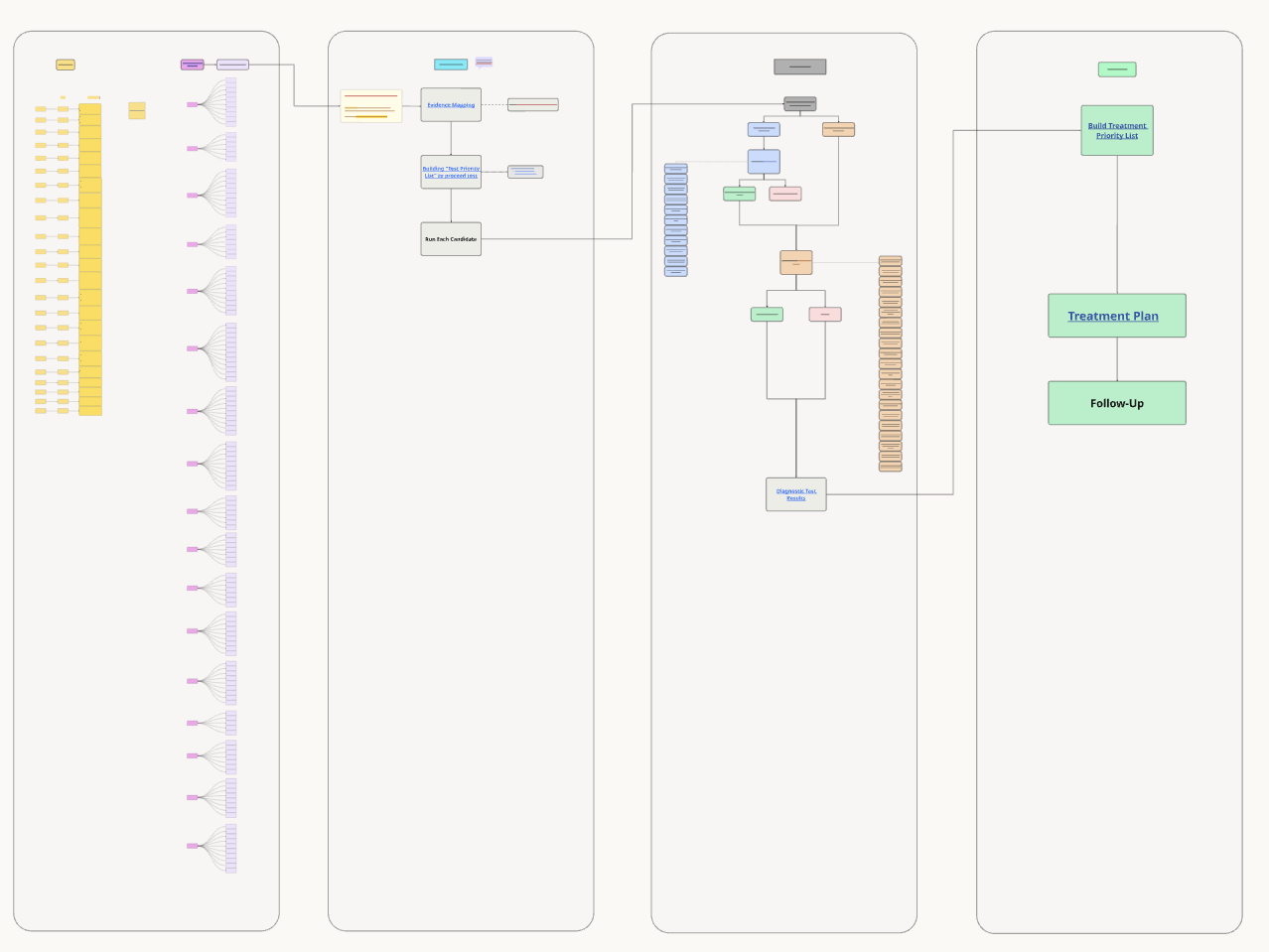
1. Start with the problem
First, look at the symptoms. What changed? When did it start?
Which list or flow is affected? And who are we sending to - Gmail, Outlook, Yahoo, etc.? Basically, get the full picture before jumping to a conclusion.
2. List of possible root causes
Don't pick one answer too early. Put a few possible reasons on the table.
Some might be obvious, like engagement falling. Others might be easy to miss but much more serious - like broken tracking, emails not being sent, or Gmail spam rates getting too high...
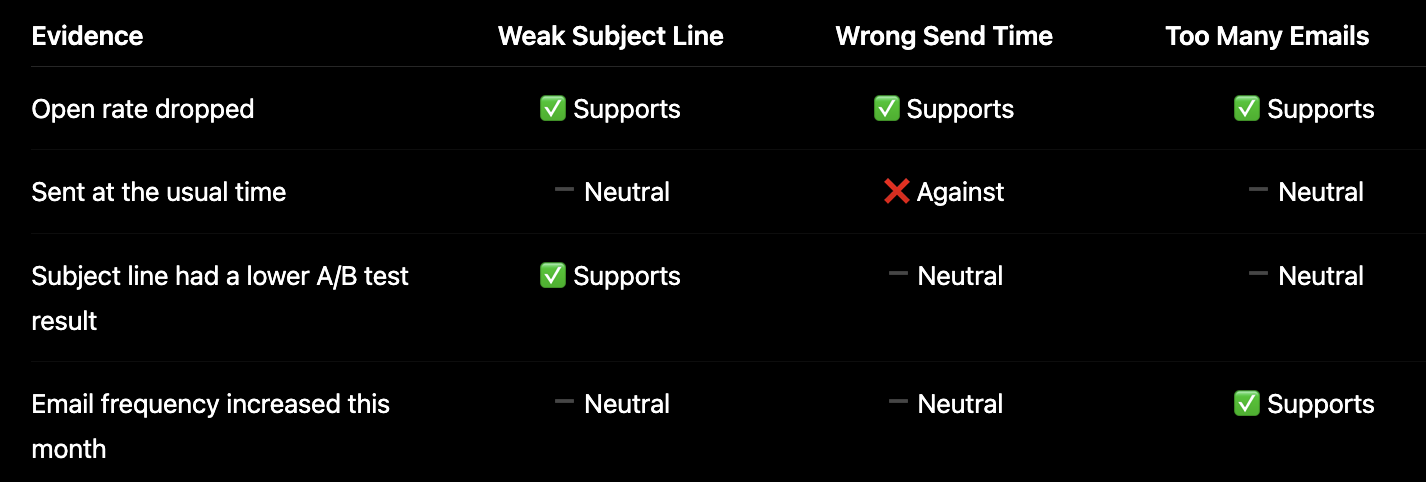
3. Look for evidence
Now check what the data says. For each possible cause, mark it as:
- Supports it (Strong Confirm)
- Leans toward it (Weak confirm)
- No change (Neutral)
- Goes against it (Refute)
- Not enough data (Insufficient data)
Start with the reports you already have. You don't need to create a new test for everything.
Run a new check when two possible causes are still pointing to different fixes, or when you know one of your numbers doesn't tell the full story.
For example, Klaviyo's complaint rate doesn't include spam reports that Gmail users make directly to Gmail. And blended open rates can be inflated by Apple Mail prefetching emails.
So if you're treating Klaviyo's complaint rate as the complete Gmail spam story, you're making a decision based on a number that doesn't include all the users...
4. Decide what's confirmed
Only call something a confirmed root cause when the evidence supports it. And yes, you can have more than one confirmed cause at the same time...
5. Fix the most important thing first
Not every confirmed problem needs to be fixed in the same order. If one problem makes the other numbers unreliable, fix that first...
For example:
- Authentication is broken
- Tracking isn't working
- A flow is turned on, but Email #1 isn't reaching anyone


You can't really trust the other numbers until those things are fixed. Once the data is reliable again, go after the confirmed problem that's having the biggest impact on revenue.
6. Make a plan and follow-up check what happens
Decide what you're going to watch after the next clean send. Then see what happens. If the number improves, great - you've got more evidence that your diagnosis was right.
If nothing changes, don't just move on. Bring the possible causes back out and mark them again based on the new evidence...
Does the Email DDx method actually work?
Yeah, it can - as long as we've thought through the possible causes, checked the important ones, and backed each one up with data.
The catch is that the method can only be as good as the list of causes we start with and the data we look at.
So if we run another send and something still looks off, that doesn't necessarily mean the method failed. It probably means we missed something - maybe a possible cause, maybe a report, or maybe we're looking at a number that doesn't answer the question we're asking.
For example, blended open rates aren't enough to tell us whether people read the email. And Klaviyo's complaint data doesn't tell us specifically what Gmail users did.
So we just go around again: what could we have missed, and what data would tell us if that's happening?
And there's still a human judgment piece here. Someone has to look at the evidence and decide, "Okay, this supports the cause" versus "This is just a weak signal."
That's not something the framework can do for you. What the framework does is make that thinking more structured and easier to follow...
How this looks on a Klaviyo account
When you open a Klaviyo account, start by mapping out what's going on before adding more tests. Otherwise, it's easy to end up looking at the same data twice, just under a different name.
If engagement, traffic sources, and complaints were already covered during mapping, there's no need for another "baseline" check covering the same things. A new test is useful when there are still two possible causes that would lead to different first fixes, or when there's missing data that needs filling.
Creative testing comes later. First, the basics need to be clear. A subject line or template test can show what performs better, but it won't tell you whether the underlying problem is the list or inbox placement.
FAQs
Does this only work on Klaviyo?
No. The process can work with any email platform where you can see the account history, what you sent, and what happened afterward.
I'm using Klaviyo examples, screenshots, and product names because that's what most readers here already use.
Is Email DDx an audit?
Not exactly.
An audit looks at the account and tells you what's going on.
Email DDx does that too, then it goes one step further. A list of possible problems by itself isn't Email DDx. The important part is connecting those possible problems to what you can see in the account.
Does writing a longer list improve accuracy?
Not necessarily. A longer list doesn't automatically mean a more accurate diagnosis.
A 2025 study in pediatric emergency medicine compared two ways of writing possible diagnoses. It found that simply listing a bunch of possible diagnoses was associated with more diagnostic errors than lists that connected each diagnosis to specific findings.
But that was a medical study, not an email-marketing study, so we can't say it proves the same thing happens in email.
The useful idea here is much simpler: if you put a possible cause on the board, you should be able to point to some data or report that supports it, rules it out, or tells you that you don't have enough information yet.
Can AI replace the Email DDx framework?
AI can help you broaden the list of possible causes, but it can't replace the Email DDx framework.
You still need the framework to work through those causes, check the account data, confirm what's happening, and decide what to fix.
Where to go next
If you want to do this for your own Klaviyo account, you can get a diagnosis and see what's going on. Or start with the guide that matches the symptom in front of you.
We use this same method in a Klaviyo audit on your account.